
Introduction
In the modern digital era, almost every system we interact with—online shopping, banking, social media, and university portals—relies on database systems. Databases help organizations store, manage, and retrieve large volumes of data efficiently and securely.
This article provides a clear and beginner-friendly introduction to database systems, explaining key concepts such as data, databases, DBMS, file-based systems, and why databases are essential in today’s world.
What Is Data?
Data refers to raw facts and figures that have not yet been processed. On its own, data has little meaning.
Examples of data include:
- Customer names
- Product prices
- Dates and transaction numbers
- Employee records
Organizations generate data from many departments such as accounting, payroll, production, sales, and customer services.
When Does Data Become Information?
Data becomes information when it is processed, organized, and structured in a meaningful way.
For example:
- A list of sales figures is data
- A monthly sales report showing trends and totals is information
Effective data management allows organizations to transform raw data into useful insights that support decision-making.
Structured vs Unstructured Data
There are two common types of data:
Structured Data
- Stored in tables with rows and columns
- Easy to search and analyze
- Common in relational databases
Unstructured Data
- Includes text documents, images, videos, and audio files
- Does not follow a fixed format
Modern database systems are increasingly designed to handle both structured and unstructured data.
What Is a Database?
A database is a shared collection of logically related data designed to meet the information needs of an organization.
A database includes:
- The actual data
- A description of the data (metadata)
- Relationships between different data items
Databases organize data using entities, attributes, and relationships, making data easier to store, access, and manage.
Types of Databases and Applications
Database systems are used in a wide range of applications, including:
- Traditional databases – Store numeric and textual data (e.g., banking systems, reservation systems, e-commerce platforms like Amazon)
- Multimedia databases – Store images, audio, and video content
- Geographic Information Systems (GIS) – Manage maps, satellite images, and weather data
Real-Life Examples of Database Applications
You interact with databases every day, often without realizing it:
- Buying groceries at a supermarket
- Booking a holiday or flight
- Renting movies or streaming content
- Using websites and mobile apps
- Studying at a university
All these systems rely on databases behind the scenes.
What Are File-Based Systems?
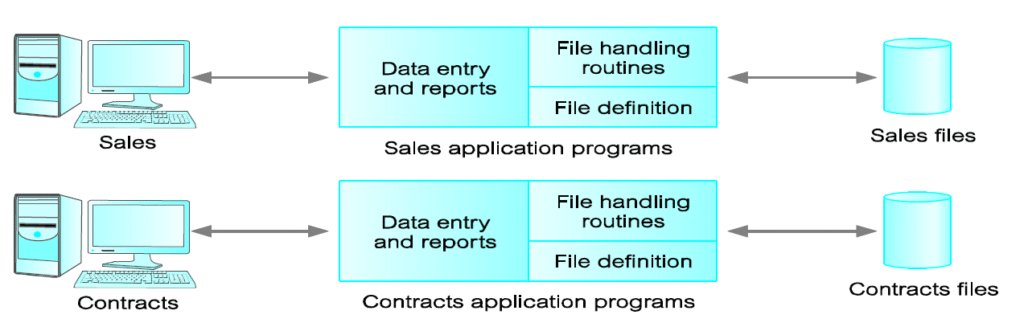
Before modern databases, organizations used file-based systems to store data. In this approach:
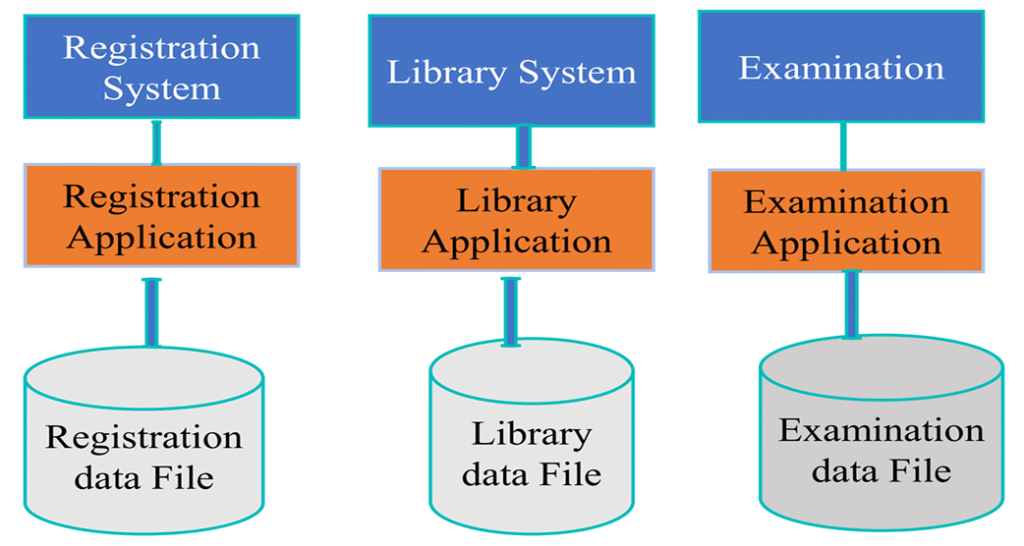
- Each application managed its own data files
- Data definitions were embedded directly into programs
- Sharing data between applications was difficult
This method was an early attempt to computerize manual filing systems.
Limitations of File-Based Systems
File-based systems have several serious drawbacks:
Data Duplication
The same data is stored in multiple files, leading to wasted storage and inconsistencies.
Data Isolation
Users and programs cannot easily access data from other systems.
Program–Data Dependence
Any change in file structure requires modifying application programs.
Lack of Flexibility
New business requirements often require creating new programs from scratch.
These problems made file-based systems inefficient as organizations grew.
The Rise of Database Systems
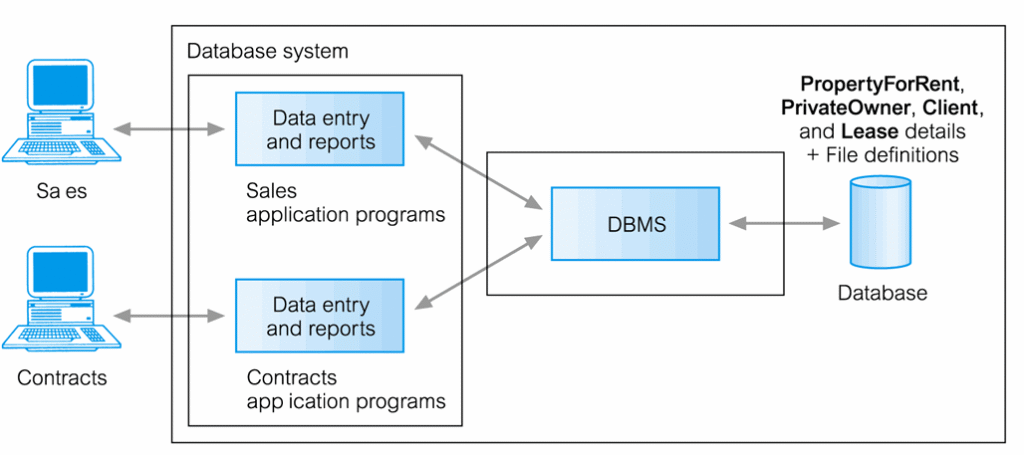
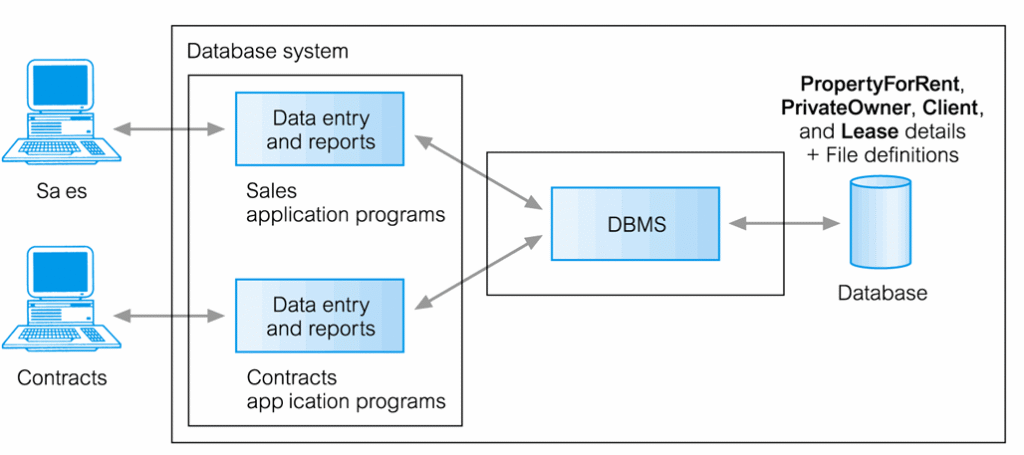
To overcome the limitations of file-based systems, Database Management Systems (DBMS) were developed.
A DBMS separates data storage from application programs and provides centralized control over data access and management.
What Is a Database Management System (DBMS)?
A DBMS is software that enables users to:
- Define and create databases
- Store, retrieve, and update data
- Control access to the database
Applications interact with the database by sending SQL queries to the DBMS.
Core Functions of a DBMS
Data Definition Language (DDL)
Used to define database structures, data types, and constraints.
Data Manipulation Language (DML)
Used to insert, update, delete, and retrieve data from the database.
Together, DDL and DML make databases flexible and powerful.
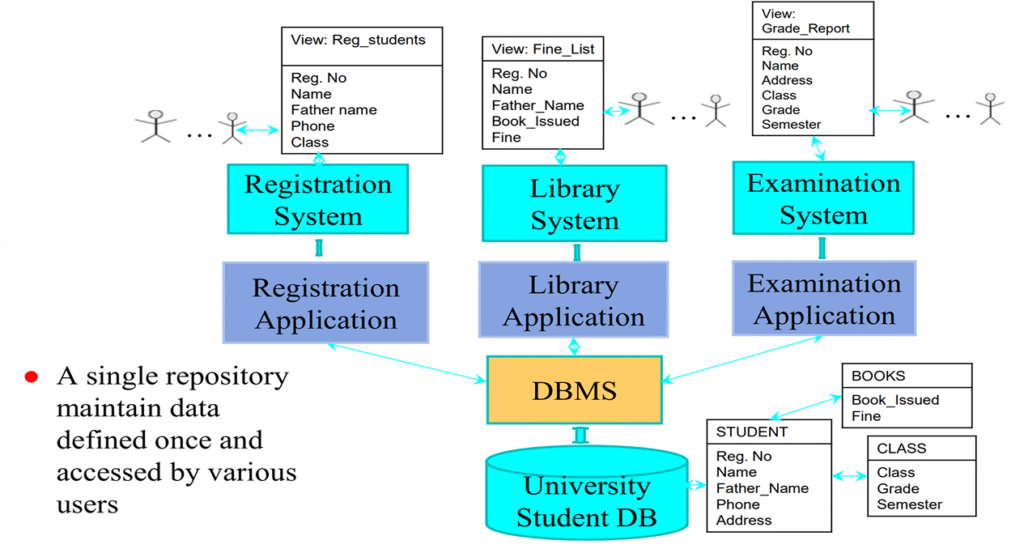
Components of a DBMS Environment
A complete database environment includes:
- Hardware – Computers and servers
- Software – DBMS, operating system, and applications
- Data – Stored data and its structure (schema)
- Procedures – Rules for database use and maintenance
- People – Database administrators, developers, and users
Key Database Concepts
Data Independence
Allows changes to data storage without affecting application programs.
Data Security
Protects data from unauthorized access using passwords and access controls.
Data Integrity
Ensures data remains accurate, consistent, and valid through constraints.
Views
A view allows users to see only a specific portion of the database, improving security and reducing complexity.
Conclusion
Database systems are the foundation of modern information systems. They enable efficient data storage, improve security, reduce redundancy, and transform raw data into meaningful information.
Whether you are a student, developer, or business professional, understanding database systems is essential in today’s data-driven world.
*** END OF THE TOPIC ***